Friday, May 22, 2020

Snatch your team members out of Outlook! - Using the Quote button for Teams Adoption


I talked today in my weekly webinar about using the Quote feature to increase Teams adoption, and kill minimize email. :)


This can help bring email conversations in Teams, or to help callout what parts of someone's message you're replying to. Check out the video below:


Sunday, March 8, 2020

One Files Tab to Rule Them All

The Problem: I need to access many different document libraries for the many project files that I oversee. But, I don't need to be in every Project Team's group, engaging in their conversation chats - I just need the files!  I also don't want to go clicking all over the place every time I'm looking for a project file library.

The Answer: Use "Add Cloud Storage" to turn one Files Tab into a 1-stop shop for accessing those other libraries!


Each link (seen below) will open that library in Teams (that's right, it's better than some bookmark that opens a new window), even if that library doesn't exist in Teams (ie, even if it's just some normal SharePoint Online library with no associated MS Team):


Permissions: You would of course need to have Permissions to access each library (all handled via SharePoint), and if you don't, clicking on the links will remind you of that:


Working with the files: Even better, I can still edit, co-author and chat with my team members on a document that lives outside Teams:


Channel 'Navigation': If you happen to be someone that likes to see 'buttons' for all your libraries listed down the left-hand side, you might consider making a Channel for each library. The Channel's only purpose would be to give you access to click on a link that opens that particular file library. For example:


Search: From a Search perspective, one downside to this approach is that my Teams search box is only going to find documents that exist in Teams that I'm a part of. I could still, at least, search my "NotTeams" documents by hitting the "Open in SharePoint" button and using the "Search this library" search box.

For organizations just starting with Teams, wondering how to incorporate all their existing pre-Teams SharePoint Online libraries, this could be the answer!


Thursday, February 27, 2020

Mention with ease! in Microsoft Teams

What if your hashtagMicrosoftTeams teammates are listed in the system as "Lastname, Firstname", but you want to use their first name when you @mention them in chat, and you're tired of all the backspacing? Use Ctrl+LeftArrow, then Backspace, and watch the magic happen... Did it work? :)


Friday, February 21, 2020

Not-so Invisible Files in Microsoft Teams

When I'm helping customers work with files in Microsoft Teams, I often remind them to make sure their files are all in folders that are aligned to Channels, because otherwise Teams users can't see them.

This is mostly true, but this video talks about how there are some caveats to this, and also shows what changes to make to get the best files experience:


Friday, January 31, 2020

Quickest way to put an email in Microsoft Teams from Outlook


Essentially, you Save As your email in Outlook, then hit Save As again, and drag your email from that window into your Teams message.

Friday, January 10, 2020

Teams Live Event - Jan 10 Q&A

To all those who joined me in this morning's Live Event, I wanted to respond to a question here, as promised:

To the question of whether you could join a Live Event via phone bridge, looks like the answer is No. There isn't a phone number generated for the purpose of being used as an alternative to connecting via web and/or Teams client.

Given that the phone bridge scenario is often used as a friction-less, non-techie way of joining calls/events, at least we know that someone only needs a web browser to join and get audio/video, and doesn't need the full Teams desktop client, or some other software install. They could also join via mobile app as well.

Hope that helps!


Tuesday, January 7, 2020

Teams Gamification at the Columbus, OH User Group - Jan 2020

I'll be speaking next week at the local Columbus OH user group for Office365 on the topic of Microsoft Teams Gamification. 

It'll be a demonstration and overview of the topics I discussed in my blog post, showing the integration of Teams, PowerBI, Flow and more.

Find more detail at www.buckeyespug.com.  Come check us out!

10.png

Friday, November 1, 2019

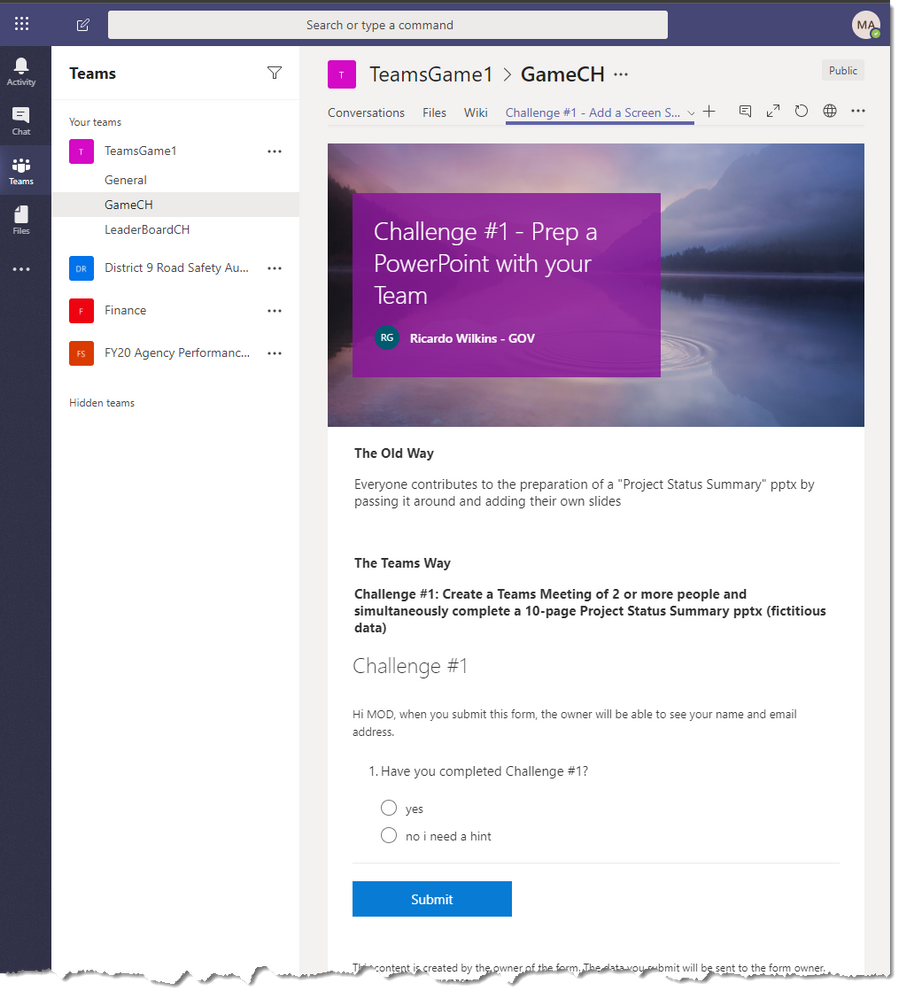
Gamification of Teams Adoption with Teams, Flow, PowerBI and Forms

What if we could turn a list of use case tasks into a game, complete with a leader board, that an organization could use to help their users get excited about Teams?

Here’s my idea of how that could be done with Teams, Flow, PowerBI and Forms...

https://techcommunity.microsoft.com/t5/Public-Sector-Blog/Gamification-of-Teams-Adoption-with-Teams-Flow-PowerBI-and-Forms/ba-p/931745


Monday, October 28, 2019

Talk to a SQL Database in Azure Gov from a Teams chat: Using Teams & Flow in the Government Cloud

Bot integration in Teams isn't available yet in the Government Cloud [as of this writing], but we can still 'talk' to other systems (like a SQL database) using Flow.  In this scenario, whenever someone posts in the Channel, Flow will respond with an automated post after querying the SQL database...

https://techcommunity.microsoft.com/t5/Public-Sector-Blog/Talk-to-a-SQL-Database-in-Azure-Gov-from-a-Teams-chat-Using/ba-p/810047


Saturday, October 12, 2019

No Teams Templates = No Problem: Using Teams & Flow in the Government Cloud

If you've been paying attention, you might have noticed the lack of templates in Gov Flow for Teams. Let's take a look at why we can still benefit from those same types of Flows, even without the templates...

https://techcommunity.microsoft.com/t5/Public-Sector-Blog/No-Teams-Templates-No-Problem-Using-Teams-amp-Flow-in-the/ba-p/776568